
You’ve got 30-plus leads in your phone, five deals open at different stages, and a stack of past sellers you keep meaning to call back. One lead came in from a Facebook ad, one from your site, two from a mailer, and you honestly can’t remember which is which. Something always slips. A seller you talked to three weeks ago just sold to the guy who called them back, and you didn’t.
That’s the problem a CRM solves. This guide walks through how to use a CRM for real estate the way an operator actually runs one: from the moment a lead hits your system to the closing table, and on into the past-client pipeline that feeds your next deal. Not a tour of buttons. The real workflow, and the reason each step matters in leads, calls, and closings.

The lead notification is the easy part. Not losing the lead after it comes in is the whole job.
In this guide:
- What Is a Real Estate CRM (and What It Actually Does)
- Why Investors Who Use a CRM Earn More
- How to Set Up Your Real Estate CRM in 5 Steps
- How to Capture and Score Leads in Your CRM
- How to Nurture Leads with Automated Follow-Ups
- How to Manage Your CRM Pipeline Day to Day
- How to Personalize Client Communication at Scale
- Common Real Estate CRM Mistakes to Avoid
- Get Your CRM Found by AI and Search
- Frequently Asked Questions
What Is a Real Estate CRM (and What It Actually Does)
CRM stands for Customer Relationship Management. In real estate it’s one system that holds every lead, every open deal, and every past client, and tells you what to do next with each of them.
It captures leads automatically from your website and portals, including the IDX feed (the live MLS listings that show on your site). It tracks each deal as it moves through your pipeline. It syncs with your email and calendar so a follow-up call lands on your task list instead of in your memory. When a seller fills out your “we buy houses” form at midnight, the CRM logs the lead, tags where it came from, and drops a task on your phone before you’ve had coffee.
Here’s the difference that matters. A spreadsheet stores names. Your phone contacts store numbers. A CRM stores the whole relationship and then reminds you to work it: who to call today, who went quiet, which seller’s timeline is about to turn hot. A spreadsheet needs you to remember to open it. A CRM comes looking for you. That shift, from a list you have to check to a system that pushes the next action at you, is the entire point.
Why Investors Who Use a CRM Earn More
The gap between operators who use a CRM and those who don’t shows up in the income numbers. Around 60% of agents earning $100,000 or more a year use a CRM, while 65% of those earning under $35,000 don’t (LLCBuddy). The top earners aren’t necessarily working more leads by hand. They’re not losing the ones they’ve already got.
At this point the tool is close to standard equipment. About 78% of real estate firms now run on cloud-based CRM software to keep their data in one place and automate the busywork (LLCBuddy). When most of the field is organized and you’re working off memory and a legal pad, the disorganized operator is the one leaving deals on the table.
Think about it in your own numbers. If you generate 40 leads a month and let even three good ones go cold because nobody followed up, that’s three shots at an assignment fee or a flip, gone, on leads you already paid to get. None of this replaces the human side of the business. The CRM doesn’t make the call, build the rapport, or close the deal. It just makes sure the call actually happens, so the opportunities you paid to generate stop slipping through the cracks.
How to Set Up Your Real Estate CRM in 5 Steps
Setting up a CRM isn’t a weekend of clicking every button in the settings menu. It’s five steps, in order, and the order matters because each one feeds the next. Do them in sequence and the system runs itself. Skip step one and everything after it inherits the mess.
- Import and clean your contact data.
- Connect your lead sources.
- Build your sales pipeline stages.
- Set up automated follow-ups.
- Define the KPIs you’ll track.
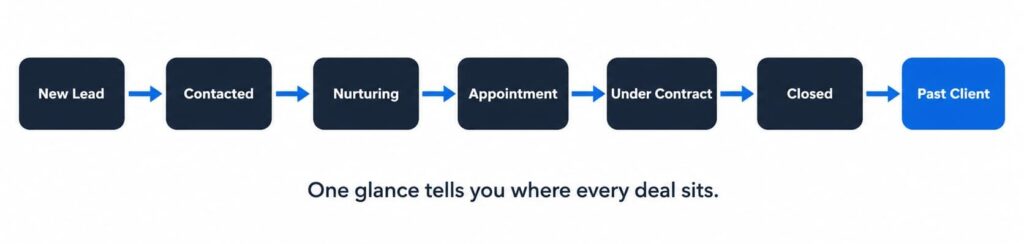
The seven stages every real estate deal moves through, from first contact to repeat referral.
Step 1: Import and Clean Your Contact Data
Bring in every contact, but bring them in complete. Each record should carry the contact’s preferred method of contact, property type, price range, timeline, and the original lead source. Those fields are what make everything later actually work. The “original source” field alone tells you six months from now whether your PPC or your direct mail is really producing deals.
Before you import, clean the list. Remove duplicates and verify phone numbers and emails, because a drip campaign sent to a dead address is worse than no campaign at all. Then segment: motivated sellers, cash-buyer list, past clients, and sphere. Say you’re importing 1,200 old contacts from three spreadsheets and a shoebox. If 200 are duplicates and 150 have dead numbers, you want that cleaned up now, not discovered when a seller replies “who is this?” to your automated text. Dirty data poisons every automation you build on top of it.
Step 2: Connect Your Lead Sources
The goal is leads that land in the CRM on their own, so you’re never retyping a name at 9pm. Connect your website and IDX, your social profiles, your paid ads, the portals like Zillow and Realtor.com, your open houses, and your referral sources. If you’re still figuring out which channels actually produce, start with how to get motivated seller leads and where social media fits as a lead source.
Then wire in the tools around it: email, calendar, your MLS, and transaction management. Manual entry is where leads go to die. Every hand-typed lead is a chance to fat-finger a digit or forget to enter it at all, and the one you forget is always the one that would have closed. Picture a Saturday with two showings and an open house: the leads you collect on paper won’t get typed in until Monday, and by Monday two of them have already called a competitor. Direct integration closes that gap to zero.
Step 3: Build Your Sales Pipeline Stages
A deal isn’t one thing. It’s a sequence, and your CRM should show it as one. Build clear stages: New Lead, Contacted, Nurturing, Appointment, Under Contract, Closed, and Past Client. When every deal sits in exactly one stage, your sales pipeline for real estate tells you at a glance where your business actually is, not where you hope it is.
Most CRMs let you save workflow templates by deal type, so a “First-Time Home Buyer,” a “Luxury Listing,” and a “Commercial Lease” each move through their own tailored steps. A probate lead and a tired-landlord lead don’t need the same touches or the same timeline, and templates let you honor that difference without rebuilding the process every time. Set those up once and every new lead of that type drops into the right track automatically.
| Pipeline stage | What it means | Example CRM action |
|---|---|---|
| New Lead | Just came in, not yet contacted | Auto-assign + instant welcome text |
| Contacted | You’ve made first contact | Log the call, set next task |
| Nurturing | Interested but not ready | Drip sequence + timed check-ins |
| Appointment | Meeting or call booked | Calendar sync + reminder |
| Under Contract | Deal signed, in process | Task checklist to closing |
| Closed | Deal done | Move to past-client track |
| Past Client | Closed, now a relationship | Quarterly check-in + referral ask |
Step 4: Set Up Automated Follow-Ups
This is the step that pays for the whole system. Set an automated response, text or email, to fire within seconds of a new lead hitting the CRM. Speed to lead is not a nice-to-have. Responding within five minutes can lift your contact and conversion rate by up to 900%, and 78% of buyers end up working with whoever answered first (AgentZap). The lead’s attention is never hotter than the second after they hit submit.
Then layer in the automation behind it. A simple trigger looks like this: new lead comes in, they get an instant welcome message, a call task drops onto your phone, and if they go quiet a timed drip series keeps the thread warm. Tools like HubSpot, Follow Up Boss, and Pipedrive all handle this out of the box. Build the sequence once and it runs on every lead, at 2am, while you’re asleep, so the seller who filled out your form at midnight already has a reply waiting when they wake up. That reply is often the only reason they call you back instead of the next name on their list.
Step 5: Define the KPIs You’ll Track
A CRM full of activity you never measure is just a fancier address book. Pick the numbers that tell you whether the machine is working: lead conversion rate, response time, call volume, deals in each pipeline stage, and the return on each lead source.
That last one is where the money decisions live. When you can see cost and closings per source, you know which channel deserves more budget and which is quietly burning it. If your mailers cost $40 a lead and close at 2%, and your organic leads cost a fraction of that and close at 8%, the dashboard just told you where next month’s budget should go. Review it weekly, then fix the workflow behind any number that’s off. The dashboard’s job isn’t to look impressive. It’s to turn a week of activity into next week’s decision.
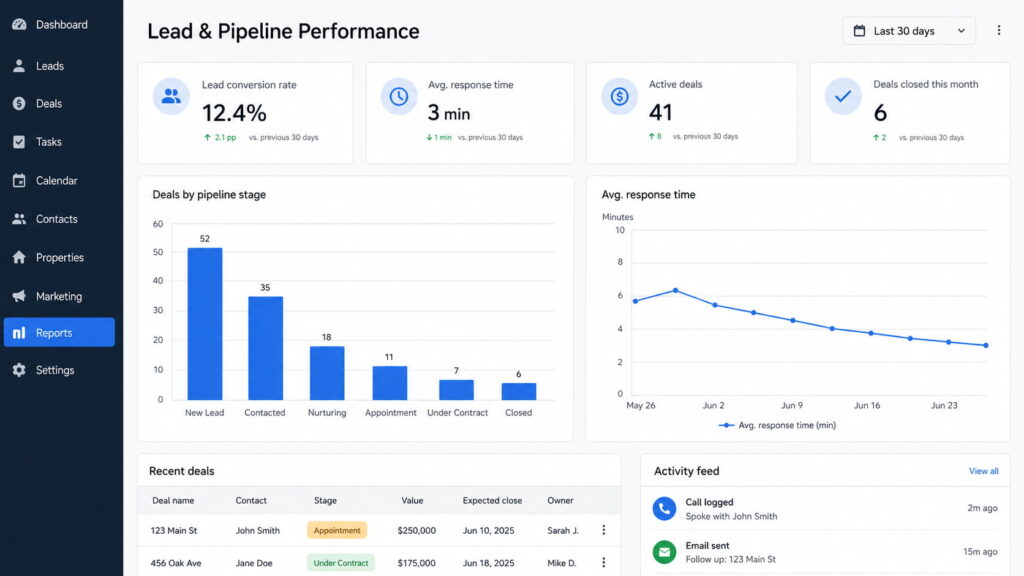
A CRM dashboard built around leads, response time, and deals by stage, the numbers that actually drive decisions.
How to Capture and Score Leads in Your CRM
Two jobs happen at the front of the CRM. Lead capture is the form, portal, or tracked call that drops a new lead into the system automatically, no typing required. Lead scoring is the CRM ranking those leads by behavior so you know, without guessing, who’s actually ready.
The scoring signals are behavioral: how often they visit your site, whether they open your emails, which properties they save or view. A lead who views five listings in the same ZIP code in one evening is telling you something a cold name in a spreadsheet never could. That’s the one you call first. Compare two leads that came in the same hour: one downloaded your “sell your inherited house” guide and opened three of your emails, the other filled out a form and went dark. Same timestamp, very different temperature, and scoring is what surfaces that so you spend your first call on the right one.
The rule is simple. Work the hot leads first. A scored list beats a first-in-first-out list every time, because the freshest lead isn’t always the readiest one. Scoring by intent is the same logic behind how BASEO classifies inbound form-fills against motivated-seller signals in its reporting, so the highest-intent seller rises to the top of the call list instead of getting buried under a week of tire-kickers.
How to Nurture Leads with Automated Follow-Ups
Real estate lead nurturing is regular, useful contact with a lead from the first inquiry all the way through the close and beyond. Most sellers aren’t ready the day they fill out your form. The house isn’t cleared out yet, the probate isn’t final, the spouse isn’t on board. Nurturing is how you stay the person they call when they finally are.
The math here is brutal for anyone who gives up early. Around 80% of sales close after the fifth contact, yet 48% of people never follow up even once (ProfitOutreach). The deal is usually sitting in the follow-up nobody bothered to send. If half your competitors quit after one touch, consistent follow-up alone puts you ahead of them without generating a single extra lead.
A model sequence runs three to five messages over one to two weeks:
- A short, personal intro with one real question about their goal or timeline.
- A curated market update or a relevant opportunity for their area or situation.
- A low-pressure nudge toward a quick call.
The rule that makes it work: every message gives something. A number, an answer, an option they didn’t have before. A message that says “here’s what three houses on your street sold for last month” gets read. A fifth message that just says “still thinking about selling?” gets deleted. If all your touches only ask for the appointment, you’ve built a nagging machine, not a nurturing one. Give value, and the call gets easy.
How to Manage Your CRM Pipeline Day to Day
The daily routine is short and the same every morning. Open the CRM, work today’s task list, move any deals that advanced into their new stage, and log every conversation in a sentence or two.
That last habit is the one people drop, so protect it. Logging a call should take seconds, not a twelve-field form. If capturing what just happened feels like paperwork, you’ll skip it, and a pipeline you don’t log is a pipeline you’re guessing at. A quick “spoke to seller, wants to close after probate clears in March, follow up Feb 15” is all it takes, and future-you will thank present-you when that task pops up on the right day.
The payoff is the view. A visual pipeline shows you at a glance who’s stuck where, and three deals parked in “Appointment” for two weeks is a signal you’d never spot in a spreadsheet. That kind of stall usually means a follow-up got dropped, and the board catches it before the deal goes cold. And because the good CRMs have a mobile app, you can log the call from the truck right after a drive-for-dollars stop, while the details are still fresh instead of half-forgotten by dinner.
How to Personalize Client Communication at Scale
The data you captured back in step one is what lets you sound like you remember everyone, even at a hundred contacts. A seller’s situation and timeline, a property’s condition, a buyer’s must-have school district: pull those into your outreach and a generic check-in becomes a message that reads like it was written for one person.
That’s the trick a CRM makes possible. The template stays consistent, the details stay personal, and you don’t have to choose between reaching everyone and sounding human. “Hi Karen, last time we talked the roof was the holdup on the Maple Street place, how’s that going?” takes the CRM two seconds to tee up and lands like you’ve been thinking about her deal all week. You get both scale and the personal touch.
The clearest example is the match alert. Set the CRM to flag when a new listing or opportunity fits a client’s saved criteria, and you can reach out the same day with something they genuinely want, instead of a “just checking in” that lands like every other one in their inbox. That single timely message often restarts a conversation that had gone quiet for months.
Common Real Estate CRM Mistakes to Avoid
A CRM only helps if you use it the way it’s built to be used. Here’s where operators waste the tool:
- Not logging activity, so the CRM is always working half-blind and its reminders drift out of sync with reality.
- Buying a generic CRM built for no industry in particular instead of one made for real estate, then fighting it forever.
- Over-automating until every message sounds like a bot and your leads start tuning you out.
- Never cleaning the data, so the list slowly fills with dead numbers and duplicates.
- Ignoring past clients and your sphere, which is the cheapest repeat-and-referral deal flow you’ll ever have.
- Never opening the KPI dashboard, so you’re collecting numbers you never turn into decisions.
The thread running through all six: the CRM does exactly what you put into it and nothing you don’t. Feed it clean data and honest logging, and it pays you back in deals you’d otherwise have forgotten. Neglect it, and it becomes another subscription you resent.
Get Your CRM Found by AI and Search
Here’s the honest part nobody selling you software leads with. A CRM only multiplies the leads you already have. A perfect pipeline with an empty top is just a very organized way of catching nothing.
So the real question is where the new leads come from. Sellers still search Google, and now a growing share of them ask ChatGPT and Google’s AI Overviews how to sell a house fast for cash. That traffic is worth paying attention to: ChatGPT visitors convert at 15.9%, against 1.76% for Google organic (Seer Interactive), because the AI already qualified them before they clicked.
Getting your site to show up in that organic search and in those AI answers is a completely different job from running your CRM, and it’s the one BASEO does for cash home buyers. If you want the deeper version, here’s how SEO for a real estate website actually works. Fill the top of the funnel, and the CRM you just built finally has something to run on.
Frequently Asked Questions
CRM stands for Customer Relationship Management. In real estate, it’s software that centralizes leads, contacts, and transactions, capturing leads from portals and your website, tracking deals through your pipeline, and integrating with MLS, email, and calendars so no client or follow-up slips through the cracks.
Yes. More than 60% of agents earning over $100,000 a year use a CRM, while 65% of those earning under $35,000 don’t. For an investor juggling dozens of motivated-seller leads, a CRM makes consistent follow-up possible at scale, which is where most deals are won or lost.
Real estate CRMs range from free plans to roughly $25–$500+ per user per month, depending on features like automation, IDX website integration, and AI lead scoring. Many investors start on a low-cost or free tier and upgrade as their lead volume and team grow.
The best CRM depends on your workflow, but popular real estate options include Follow Up Boss, HubSpot, Pipedrive, Zoho, and Propertybase. Prioritize lead capture, automated follow-ups, pipeline management, a strong mobile app, and integrations with your MLS and marketing tools.
A basic setup takes a few hours: import and clean contacts, connect lead sources, and build pipeline stages. Full setup with automations, drip campaigns, and team training typically takes one to two weeks before the system runs smoothly on its own.
Final thoughts
A CRM doesn’t create deals. It stops you from losing the ones already in the door, and used right it’s the whole difference between the operator who closes on the fifth touch and the one who quit after the second. Import clean data, connect your sources, build real stages, automate the follow-up, and watch the numbers that matter.
Then check the top of the funnel. The best-run CRM in your market is still only as good as the leads flowing into it, so if you can’t say exactly where your organic and AI-search leads come from, that’s the gap to close first. If you want to know that before you build the machine to catch them, that’s what the audit is for. Free, in writing, no call required, yours to keep.