Most landscapers think having a website means having a presence. It doesn’t. And to be clear about which website this is: it’s the site for your landscaping business, not software for designing somebody’s backyard.
You built the company on referrals, and Facebook and a paid listing filled the gaps. That worked until the calendar stopped filling the way it used to, and now you’re looking at a site somebody built you five years ago that has never sent you a job.
A website is a dispatcher, not a brochure. It gets found in the towns your trucks already drive through, proves the work is real, and turns a stranger into a quote request you can answer from the cab.
In this article
- What a landscaping website has to do before it looks good
- How to make a landscaping website in 8 steps
- The two landscaping website pages that book jobs
- The quote request: the form, the phone, and the 30 minutes after
- What your website has to prove: photos, reviews and trust signals
- Your website and your Google Business Profile are one system
- Speed and mobile: two landscaping website checks before launch
- Build it yourself or pay someone: the honest math
- How to tell if your landscaping website is working
- Landscaping website FAQs
The reader of this article is the person in this photo, not the person who owns the lawn.
What a landscaping website has to do before it looks good
Three jobs, in this order. Get found in the towns your crew already drives through. Prove the work is real. Turn a visitor into a quote request you can answer at a red light, between stops.
Now picture the site most landscaping companies have. Five pages, a stock photo of a garden nobody on your crew touched, one page called “Services” listing eleven things you do, and a contact form emailing an address nobody has opened in years. That site isn’t neutral. It’s working against you.
BrightLocal’s 2026 research asked people why they decided not to contact a local business. 62% named a signal of inactivity: no reviews, old reviews, missing information, no photos, a listing that looked abandoned (BrightLocal). Those are the exact signals a five-year-old landscaping site sends without anybody deciding to send them.
A page for every service you sell and a page for every town you serve are what book jobs. The homepage is where the homeowner confirms you’re real afterward. That’s the core of what BASEO builds, and the difference between a site that gets compliments and one that fills a schedule.
How to make a landscaping website in 8 steps
- Buy the domain in your own name, not your web guy’s.
- Pick a platform you can update from your phone between jobs.
- Map every page before you design a single screen.
- Write the homepage as a dispatcher, not a brochure.
- Build one page per service, ordered by what the job pays.
- Build a page for every town your crew drives to.
- Put the quote request on every page, and make it qualify.
- Launch, then connect the site to your Google Business Profile.
The first three are expensive to reverse. The rest you can change on a Tuesday.
Step 1: Buy the domain in your own name
The registrar account goes in the business name, the business email is the owner on file, and you hold the login. Same rule for your Google Business Profile and your hosting. If you can’t log in, you don’t own it.
Here’s what happens when you skip it. The guy who built your site registers the domain under his own account, because it’s faster. Two years later he stops answering, the card on file expires, and the site with your phone number goes dark in the middle of June. Getting it back is a paperwork process with a registrar that has never heard of you, not a phone call.
Use the business name, not landscaping-yourtown-2024. Keyword-and-year domains looked dated on January 2nd and you can’t put one on a truck without explaining it.
Step 2: Pick the platform and the template
The question isn’t which platform is best. It’s who maintains the site. If that’s you, one thing matters: can you change a phone number from your phone, between stops.
What they cost in time rather than stars: WordPress gives the most control and asks for the most upkeep. Squarespace and Wix let you add a job photo from the cab in under a minute, and will fight you the day you want fourteen town pages. Webflow carries a learning curve nobody climbs in March. Green industry builders get you live before the season and trade flexibility for it.
Choose the template for what it has to show, not how the demo photo looks. Skip the generic “home services” template: it’s built for a plumber, an electrician and you at once, so your site reads exactly like the plumber’s.
Step 3: Map every page before you design
The page map is the build, and it goes on paper before anybody opens a design tool.
The formula runs five ways: a homepage, one page for each service on your price list, one for each town on your route, one that proves the work, and a contact page.
Then count the rows. Five services across six towns is about fourteen pages. That feels like a lot the first time, and it’s the honest number.
Design first and map later and here’s where you land: one page called “Services” with eleven items, and zero pages for the towns your trucks sit in every week. The site looks good. There’s no way in.
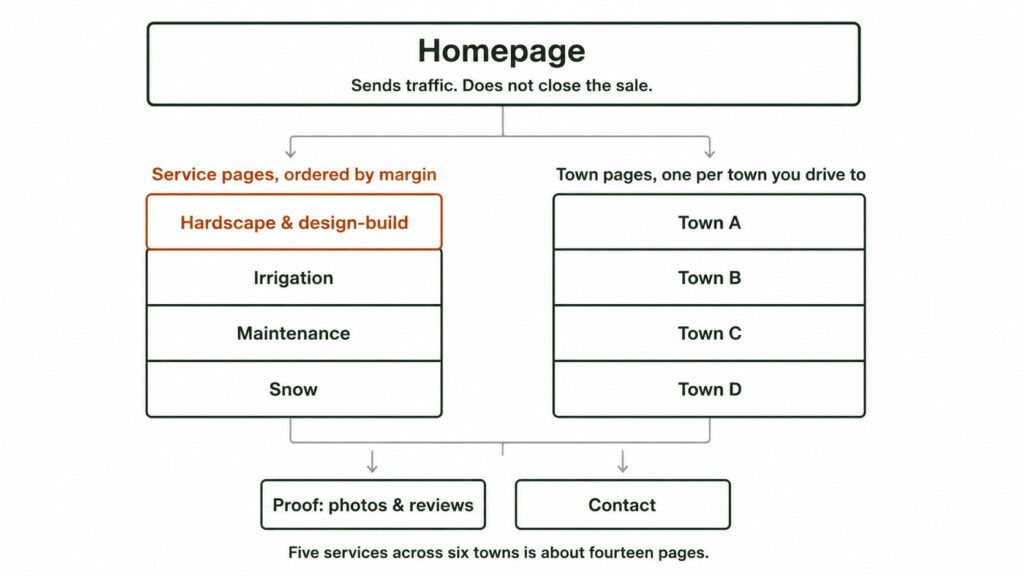
The page map, before a single screen gets designed.
Step 4: Write the homepage as a dispatcher
Above the fold, three things: what you do, where you do it, and one action that takes one tap. Call, or request a quote. The homepage routes traffic to the service and town pages; it isn’t trying to close the sale by itself.
The most common miss is a homepage that says “quality landscaping since 1998” and never names a town. It reads fine to you, because you know where you work. To a stranger two suburbs over it says nothing. What to write on each page covers the wording page by page.
Step 5: Build one page per service, ordered by margin
One page for every service you actually sell, ordered by what the job pays instead of how often it gets searched. For a full-service crew that means hardscape and design-build first, then irrigation, maintenance, tree work, snow.
Not the order a keyword tool would give you, which is the point. Building service pages in margin order is one of the first things BASEO does, because it moves the most revenue for the least new work.
Step 6: Build a page for every town you drive to
One original page per town: what the crew does there, jobs you’ve finished there, the services that sell in that market.
Not the same page with the town name swapped. Eleven near-identical pages give Google nothing to pick between, so it ranks none of them. That’s why BASEO builds these one town at a time instead of one template eleven times: the page has to say something only a crew working there would know.
Step 7: Put the quote request everywhere, and decide who answers it
The form and a click-to-call button belong on every page, not just Contact. On a phone, the call button sits near the top, reachable with a thumb.
Then answer one question before the first request arrives: what device does it land on. A form emailing an inbox somebody checks at 9pm is the most common setup in this trade and the worst. If you already pay for field software, Jobber or Aspire or whatever you run on, that’s your answer. Otherwise the owner’s cell phone is enough to start.
Step 8: Launch, then connect it to Google
Four connections, in this order. Your Google Business Profile, with its website link pointed at the right page. Search Console. Call tracking on every number. Form tracking on every form.
Without tracking, next month you can’t say whether any of this worked, and “we’re building authority” is what the last company said for eight months. That’s where a serious landscaping website design build starts. Pages get indexed in days or weeks; how long ranking takes in a competitive town is another question, and anybody who puts a date on it is guessing.
The two landscaping website pages that book jobs
Of everything on that page map, two types do the work. The rest supports them.
Count the pages on a site doing 28 organic quote requests a month, then count again at 77. That’s a real before and after from a San Antonio crew, six months apart (BASEO client data), and the homepage was the same on both days. What changed was the number of service and town pages underneath it.
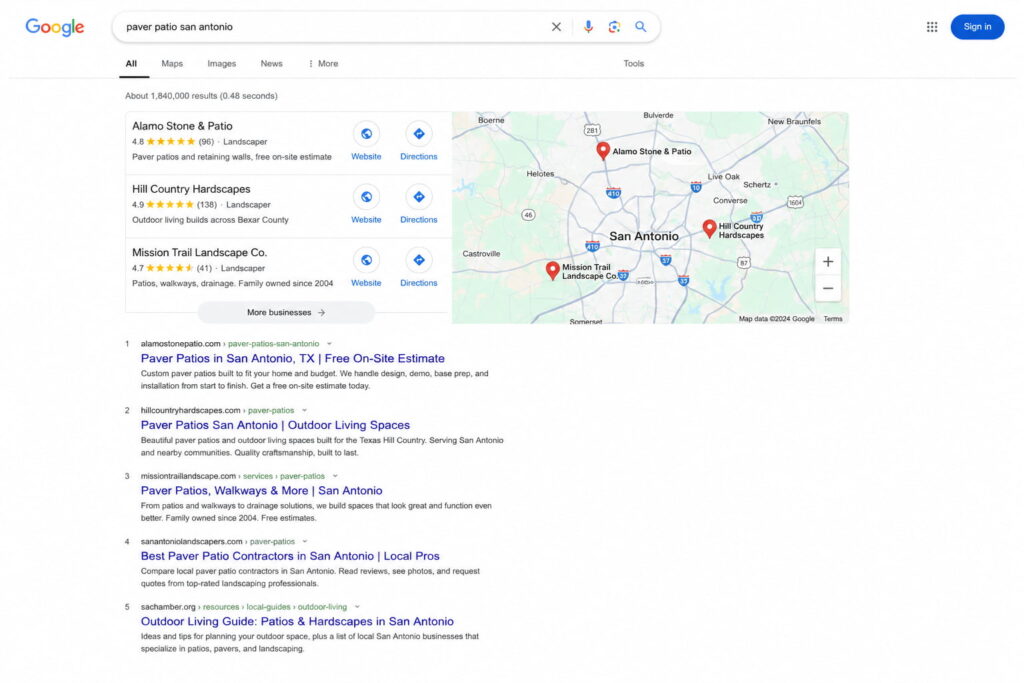
This is the search a service page is built to land in. A homepage cannot rank here.
Rank for the patio, not the mow
A patio is worth about forty mowings. Both take one page, one set of photos and the same months of patience to rank.
Here’s the part that matters for a page map: the patio and the mow are not the same page. They’re two builds, and you decide which gets written first. Most crews write the mow page first, because mowing is what they do every day. The patio page is the one that pays, and it’s usually still on the list in September.
Two jobs off that crew’s pages were a $14,800 patio and an $18,600 retaining wall, both closed from organic search (BASEO client data). That’s why ranking for hardscape searches is its own piece of work, not a bullet on a services page.
A page for every town you actually drive to
The town page argument isn’t really about search. It’s about route density.
The second job on a street your truck already turns down is nearly pure margin. No new drive time, no new fuel, the crew is already there. So the towns worth a page aren’t the biggest ones. They’re the ones your route already touches. That ordering doesn’t come out of a keyword tool. It comes off your schedule.
Why the homepage isn’t your most important page
Most operators believe the homepage is their most important page. It isn’t close.
The homepage is the lobby. Nobody walks in off the street through a lobby. They come in through the door for the service they searched, or the town they live in, then walk through the lobby to check you’re real.
Which makes the most expensive mistake in a redesign obvious: spending the whole budget on the lobby. New homepage, new photos, new tagline, same eleven-services-on-one-page structure underneath. It looks better and has as many ways in as before.
The crew above you on the map usually isn’t better at landscaping. They published the pages you never wrote.
Want to know which of these pages your site is missing? That’s what the free audit is for: your site, your top competitor’s pages, and your market, in writing. Free. No call. Yours to keep, even if we never speak again.
The quote request: the form, the phone, and the 30 minutes after
Every guide says “add a contact form.” Then it stops. Here’s the part that decides whether the form is worth having.
The four fields that qualify. Service, town or address, rough property size, timeline. Those tell you whether it’s a $400 cleanup or a $20,000 build before you get in the truck.
The trade-off, said out loud. Every field you add lowers submissions and raises quality. Two fields brings tire-kickers. Twelve, nobody finishes. Four is where most crews land.
Click-to-call is the primary action on a phone, not the fallback under the form. These visitors are outside holding a phone, and a tap beats typing.
Then the part nobody writes about.
The form comes in at 2pm. You’re on a mower with ear protection on and the phone in the truck. BrightLocal’s 2026 research found 75% of consumers decide which local business to use in under 30 minutes, 28% in under 5, and 72% never look at more than three (BrightLocal). That’s the window, and it closes while you’re finishing the yard.
Two things follow, and neither requires software. It has to reach a phone, not only an email. And a missed call needs an answer the same day, even if that answer is a text saying when you’ll call back.
When a shared lead costs $78 and an organic one about $11, the request sitting unread is the expensive kind: it’s the one you already paid to earn. Quote forms that submit properly and call tracking on every number are part of what BASEO builds, because plenty of landscaping sites have a form quietly emailing an address that no longer exists.
What your website has to prove: photos, reviews and trust signals
You have twenty years of proof in your phone. Almost none of it is on your website.
The photo SOP: who shoots, when, and from where
Everyone says use before-and-after photos. Nobody says how they get produced. Five rules, all process rather than photography.
Same angle for both shots, lined up on something fixed: a corner of the house, a driveway edge, a mailbox.
One person per crew is responsible. Not “whoever remembers.”
The “before” photo gets taken before the first tool comes off the trailer. Once cleanup starts, that shot is gone.
Permission gets asked during the walk-through, while the customer is excited, not three months later over text.
And they get filed by service and by town, because that’s the only way a page can use them. Four thousand photos in a camera roll is not proof. Twelve tagged “retaining wall, Cibolo” is.
Reviews belong on the site and in the profile
A review does two jobs at once. It’s proof on the page and a ranking input in your Google profile. Most crews treat it as one or the other.
Put the reviews from a job on the page for that service and that town, not on a “Testimonials” page nobody clicks. BrightLocal found 54% of consumers check the business’s website after reading positive reviews, up from 32% in 2019 (BrightLocal). The review sends them to the site. The site has to hold up.
The trust signals this trade is actually asked for
Every article on this subject says “build trust.” Here’s the actual list a homeowner in this trade looks for:
- License number, where your state issues one
- Proof of insurance, certificate available on request
- Years in business, stated plainly
- Trade memberships: NALP, and ICPI where hardscape is real work for you
- Real photos of your crew and trucks, not stock images
- A service area, named town by town
Your website and your Google Business Profile are one system
Most of these searches start on the map, not your website. The profile is the door. The site confirms the door leads somewhere real.
Name, address and phone number have to match exactly, on the site and in the profile. Same suite number, same phone format, same business name.
The profile’s website link should point at the town page for that market, not always the homepage. One-minute change, almost nobody makes it.
Photos and the service list get filled out completely in both places. Every service you sell. Recent job photos, not the four from 2019.
Only 40% of local businesses have a website at all (BrightLocal). The bar is on the floor, which is why a two-truck crew can sit above a twenty-year company in the top three on the map. They aren’t better. They filled out the profile you ignored. The map pack playbook covers what that involves.
Speed and mobile: two landscaping website checks before launch
Two checks, both mechanical, both done before you tell anybody the site is live.
Check one: open it on your phone, on mobile data, standing outside. Not the office wifi. 73% of local searches start on a phone (BrightLocal), and the searcher is usually in a yard looking at the problem. Can you reach the call button with your thumb. Can you fill the form one-handed. Do the job photos load, or crawl, because photos straight off a camera are enormous.
Check two: run the URL through PageSpeed Insights. Free, you paste the address, it grades the page.
Portent found a site loading in 1 second converts about 3x better than one loading in 5, across more than 27,000 landing pages (Portent, 2022, updated 2024). The bar is low: only 48% of mobile sites passed Core Web Vitals in 2025, meaning the three scores Google gives a page for loading speed, responsiveness and stability (Web Almanac).
Build it yourself or pay someone: the honest math
| Option | Upfront cost | Ongoing cost | Your hours | What breaks first |
|---|---|---|---|---|
| DIY on a builder | $500 to $2,500 | Platform fee, monthly | 25 to 40, in season | The pages you meant to write |
| Freelancer | $2,500 to $7,500 | Hourly, if you reach them | 5 to 10, of direction | Nobody owns it after launch |
| Green industry agency | $7,500 to $25,000 | Monthly | About an hour to kick off | The budget, if pages never ship |
Those figures are market ranges published by agencies that sell the service, so read them as the going rate rather than neutral research: Built Right Digital puts a template site at $500 to $2,500, a professional build at $2,500 to $7,500 and full custom at $7,500 and up; Landscape Leadership puts a high-end redesign at $15,000 to $25,000.
Here’s the decision rule, without the hedging.
If the site you need is a five-page brochure and your calendar is full, build it yourself. That’s the honest answer for a one-truck operation living on referrals, and anybody who says otherwise is selling.
The moment the plan includes a page per service and a page per town, your hours stop being free. That’s 25 to 40 hours of the owner’s time, landing in season, when those hours are worth the most. Forty hours in June against a quote usually isn’t close.
The middle option burns the most crews. A freelancer builds a good-looking site, hands it over, moves on. Six months later nobody has added a page and there’s no one to call. What landscaper web design costs breaks it down further.
How to tell if your landscaping website is working
Four numbers. No dashboard, no login you’ll never use.
- Calls and quote requests per month. The count, and the phone numbers behind it.
- What it costs to get one lead. Total spend divided by that count.
- Which page and town the phone comes from. This one tells you where to build next.
- Jobs you closed from the site. The only number that pays anybody.
Two things make those countable: call tracking on every number, and a form that records which page it came from. Without them, all four are guesses.
Which is the real test, and you can run it on the report in your inbox right now. Search it for a phone number you could dial. If there isn’t one, nobody counted a job. Reporting built around calls, quote requests and cost per lead is what BASEO sends, and it fits on one page because a report you need a login to read is one you’ll never open.
Checking those four numbers is about twenty minutes a month, which matters more than anything else here, because you’re reading this between jobs.
Get a free audit of the landscaping website you already have
If you got this far and realized your existing site does almost none of this, that’s the normal outcome, and a better position than starting from nothing. The problem usually isn’t that the site is ugly. It’s missing the pages that get found and the form that gets answered.
Some operators take this list and build it themselves over the winter, and do fine. Most would rather spend that time bidding jobs. Either way, what’s worth knowing first is which pages your site is missing and which ones your top competitor published two years ago. That’s what the audit puts in writing: your page map against his.
Free. No call. Written, in about two business days. Yours to keep, even if we never speak again.
Landscaping website FAQs
A template site on a builder runs about $500 to $2,500, a professional build $2,500 to $7,500, and a fully custom site $7,500 and up. Those are market ranges published by agencies. The real variable is how many service and town pages you need.
Yes. A five-page site on a builder is a weekend or two. A site with a page for every service you sell and every town you drive to is closer to 25 to 40 hours plus the writing, which is why most crews build the small one first.
The best one is the one you will actually update. WordPress, Squarespace, Wix and Webflow all rank fine; green industry builders trade flexibility for speed. Decide by who maintains it: if that is you, pick what you can edit from a phone.
Use the formula, not a number. A homepage, one page for every service you sell, one for every town you drive to, one that proves the work, and a contact page. A crew serving six towns with five services needs about fourteen pages.
Those are rented. Four other crews buy the same phone number, and the invoice arrives whether you win the job or lose it. One landscaping crew that built its own pages went from $78 a shared lead to about $11 from Google (BASEO client data).
New pages get indexed in days to weeks. Ranking in a competitive town takes months, because Google has to see the site is real before it sends jobs. Ads and a filled-out Google Business Profile fill the schedule while the pages mature.